[1] "2025-07-24"as.numeric(today())[1] 20293Dates and times are one of the more challenging data classes to deal with. There are many different ways of storing date and time information, and it’s easy to get them mixed up. Fortunately, there are a number of tricks that help make things easier, most of which are in the package lubridate, which is part of the tidyverse.
For more info, see the Dates and Times chapter in R for Data Science.
First, let’s look at dates. Dates are stored as the number of days since the origin (default origin is 1970-01-01). We can use the today function to get a date with today’s value.
Now let’s talk about date-times. R automatically stores the dates and times together as the number of seconds since the origin.
Note that R automatically set the time in Pacific Daylight time since that is what the operating system of this computer uses.
If you have a list of dates and times that you are importing into R, the read_csv or read_excel functions can usually guess when they are dates, particularly if they are in YYYY-MM-DD format, but sometimes they get confused. They have an especially hard time if they are in a non-standard format, such as MM/DD/YY. In this case, the field will get read in as a character and you have to convert it to a date/time class, usually POSIXct.
Before we do that, let’s learn a bit about different types of date/time classes.
Date - Number of days since origin.
POSIXct - Number of seconds since origin. This is the most common format.
POSIXlt - List of vectors with components sec, min, hour, mday, mon, and year. You probably won’t use this format very often.
POSIXct is more convenient for including in data frames, and POSIXlt is closer to human-readable forms. Both classes may have an attribute tzone, specifying the time zone. See ?DateTimeClasses for details.
Note: There is no built-in “Time” class, only “DateTime”. Some packages (like hms) have developed ways to deal with times on their own, but it doesn’t come with your base R installation.
The base R function to convert from characters to dates is strptime
?strptimeTo use this function, we just feed in the date in character form and specify what format it is in. The format syntax is a little annoying, but the documentation for strptime gives you all the options.
# Date in character format
date1 <- "2/3/2021"

# Convert it. Little m for month, little d for day, capital Y for four-digit year.
date1_conv <- strptime(date1, format = "%m/%d/%Y")
date1_conv
[1] "2021-02-03 PST"# Try a different format. Lowercase y for two-digit year.
date2 <- "2/3/21"
strptime(date2, format = "%m/%d/%y")[1] "2021-02-03 PST"# Now one with time included. Note that any spaces or dashes need to be the same
# in the format call as in your character vector.
date3 <- "2-3-2021 08:15"
strptime(date3, format = "%m-%d-%Y %H:%M")[1] "2021-02-03 08:15:00 PST"The format strings are quite annoying, so fortunately the lubridate package has a number of shortcut functions to make converting easier.
?ymdLet’s try the dates we converted above with these functions.
Note that strptime defaulted the time zone to PDT, whereas mdy_hm defaulted to UTC. It’s always wise to specify your time zone manually to make sure issues don’t come up.
mdy_hm(date3, tz = "America/Los_Angeles")[1] "2021-02-03 08:15:00 PST"Note that when I specified the time zone, I actually specified the location, since we switch time zones with Daylight Savings.
To get a complete list of time zone names, see OlsonNames()
If you have a dataset that is collected in California, but doesn’t use Daylight savings, use “Etc/GMT+8”. GMT (Greenwich Mean Time) doesn’t change with daylight savings, and we are 8 hours behind. Most if not all water quality data collected by DWR is recorded in Pacific Standard Time (PST) year-round, so “Etc/GMT+8” is the correct time zone to use for these instances.
date3_conv <- mdy_hm(date3, tz = "Etc/GMT+8")
date3_conv
[1] "2021-02-03 08:15:00 -08"Now its your turn to try out working with dates and times.
Create a new object for a date and time in a character format. Then, try using strptime and the functions from the lubridate package to convert the object to a date-time object. If you want, try this a few times with different date-time formats. Make sure to specify the time zone.
Click below for the answer when you are done!
# Create a new object for a date and time in a character format
my_datetime_chr <- "7/7/2025 13:00"

# Convert character object to date-time object using strptime
strptime(my_datetime_chr, format = "%m/%d/%Y %H:%M")

# Convert character object to date-time object using lubridate package
mdy_hm(my_datetime_chr, tz = "America/Los_Angeles")

# Try this again with a different date-time format
my_datetime_chr2 <- "2025-07-07 13:00:00"
strptime(my_datetime_chr2, format = "%Y-%m-%d %H:%M:%S")
ymd_hms(my_datetime_chr2, tz = "America/Los_Angeles")Sometimes you will encounter a character vector of date-times with multiple formats. While this is somewhat unusual, it is very annoying, so its good to know how to handle this issue. Fortunately the lubridate package has a function to help with this - parse_date_time(). This function has an “orders” argument that allows the user to provide a vector of more than one date-time format to try parsing.
First lets try to use the strptime and the lubridate functions we previously learned about to parse a character vector of date-times with multiple formats:
Notice that only one of the two dates parsed correctly and the other was returned as an NA value. Now lets use the parse_date_time() function:
parse_date_time(date4, orders = c("mdY", "Ymd"))[1] "2021-02-03 UTC" "2021-02-03 UTC"Both dates are now parsed correctly.
R automatically displays dates and times in Year-Month-Day format. This is the international standard. If you want to change the output format, just use the format function. Note that this converts the date back to a character class.
But really, why would you want to change the format?
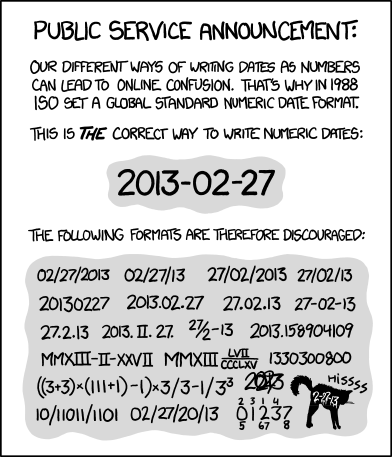
https://xkcd.com/1179
When working with date-times in R, its useful to understand how to change or convert the time zone of an object. The lubridate package has a few useful functions for working with time zones - tz, force_tz, and with_tz.
You can check the time zone of a date-time object with the tz function.
If you have a date-time object that is in the wrong time zone, you can use force_tz to change the time zone but keep the same clock time. For example,
date5[1] "2025-06-19 14:00:00 UTC"date5_conv <- force_tz(date5, tzone = "Etc/GMT+8")
date5_conv [1] "2025-06-19 14:00:00 -08"If you want to convert a date-time object to an new time zone, converting both the clock time and time zone, you can use the ‘with_tz’ function.
date5_conv[1] "2025-06-19 14:00:00 -08"with_tz(date5_conv, tzone = "America/Los_Angeles")[1] "2025-06-19 15:00:00 PDT"Now its your turn to try out working with time zones.
Create a new object for a date and time as a date-time object. Check its time zone. Then, change its time zone to Pacific Standard Time (“Etc/GMT+8”) keeping it as the same clock time. Next, convert its time zone to the US Eastern time zone changing both the clock time and time zone. Hint: use OlsonNames() to find the time zone name.
Click below for the answer when you are done!
# Create a new object for a date and time
my_datetime <- ymd_hms("2025-07-07 13:00:00")

# Check its time zone
tz(my_datetime)

# Change time zone to PST keeping it as same clock time
force_tz(my_datetime, tzone = "Etc/GMT+8")

# Change time zone to US Eastern time zone changing both clock time and time zone
with_tz(my_datetime, tzone = "US/Eastern")As noted above, there is no built-in time class. Only date/time classes. So, if we have a bunch of times, R will automatically add a date to them.
[1] "2025-07-24 01:20:00 PDT" "2025-07-24 02:30:00 PDT"
[3] "2025-07-24 03:50:00 PDT" "2025-07-24 14:00:00 PDT"
It will usually default to today’s date, or sometimes to Dec 31st, 1899. If you have a “Date” and a “Time” column in your dataframe, it’s best to just combine them for manipulation.
df_date_times <- tibble(
  times = c("1:20", "2:30", "3:50", "14:00"),
  dates = c("2021-01-01", "2023-12-01", "2011-06-04", "2022-10-11")
)

glimpse(df_date_times)
Rows: 4
Columns: 2
$ times <chr> "1:20", "2:30", "3:50", "14:00"
$ dates <chr> "2021-01-01", "2023-12-01", "2011-06-04", "2022-10-11"df_date_times_c <- df_date_times %>%
mutate(
Date = ymd(dates),
Time = strptime(times, format = "%H:%M"),
DateTime = ymd_hm(paste(dates, times), tz = "America/Los_Angeles")
)
glimpse(df_date_times_c)Rows: 4
Columns: 5
$ times <chr> "1:20", "2:30", "3:50", "14:00"
$ dates <chr> "2021-01-01", "2023-12-01", "2011-06-04", "2022-10-11"
$ Date <date> 2021-01-01, 2023-12-01, 2011-06-04, 2022-10-11
$ Time <dttm> 2025-07-24 01:20:00, 2025-07-24 02:30:00, 2025-07-24 03:50:00…
$ DateTime <dttm> 2021-01-01 01:20:00, 2023-12-01 02:30:00, 2011-06-04 03:50:00…tz(df_date_times_c$DateTime)[1] "America/Los_Angeles"If you do really want to deal with just the time part of a date-time object, use the hms package.
The lubridate package has a lot of really useful functions to extract components from dates and times such as month, year, day, etc.
date3_conv[1] "2021-02-03 08:15:00 -08"# Year
year(date3_conv)[1] 2021# Month (as number or name)
month(date3_conv)[1] 2month(date3_conv, label = TRUE)[1] Feb
12 Levels: Jan < Feb < Mar < Apr < May < Jun < Jul < Aug < Sep < ... < Dec# Day
day(date1_conv)[1] 3# Date
date(date3_conv)[1] "2021-02-03"# Day of year
yday(date3_conv)[1] 34# Day of week
wday(date3_conv, label = TRUE)[1] Wed
Levels: Sun < Mon < Tue < Wed < Thu < Fri < Sat# Hour
hour(date3_conv)[1] 8# Minute
minute(date3_conv)[1] 15Now its your turn to try extracting parts from a date-time object.
Use the date-time object you created in the last exercise. Try extracting various components from it using the functions in the lubridate package.
Click below for the answer when you are done!